> For the complete documentation index, see [llms.txt](https://docs.roboflow.com/llms.txt). Markdown versions of documentation pages are available by appending `.md` to page URLs; this page is available as [Markdown](https://docs.roboflow.com/workflows/readme.md).

# Workflows

Roboflow Workflows let you build a multi-step computer vision application in your browser - chaining models, logic, and integrations together - then deploy it to the Roboflow Cloud or your own hardware. The same Workflow runs on images, video files, and live RTSP streams through [Roboflow Inference](https://github.com/roboflow/inference).

Workflows are an ecosystem of pluggable, reusable Blocks. You connect them on a canvas, and the Workflows engine runs the finished application, which takes you from prototype to production without writing glue code. Roboflow ships a large catalog of Blocks and the community can publish their own, so the ecosystem keeps growing.

With Workflows you can:

* Detect, classify, and segment objects in images using state-of-the-art models.
* Use Large Multimodal Models (LMMs) to make determinations at any stage of a Workflow.
* Add business logic that translates model predictions into your domain language.

## Build & Deploy

<table data-view="cards" data-search="false"><thead><tr><th></th><th></th><th data-hidden data-card-cover data-type="image">Cover image</th><th data-hidden data-card-target data-type="content-ref"></th></tr></thead><tbody><tr><td><strong>Create a Workflow</strong></td><td>Start from a template or a blank canvas.</td><td><a href="/files/OtxKm6vc459M86msbPxm">/files/OtxKm6vc459M86msbPxm</a></td><td><a href="/pages/zuQq4UvDyKkQZRHYQvuL">/pages/zuQq4UvDyKkQZRHYQvuL</a></td></tr><tr><td><strong>Build a Workflow</strong></td><td>Add and connect Blocks to assemble your application.</td><td><a href="/files/KUvGfnvXDPonXXNfjPhz">/files/KUvGfnvXDPonXXNfjPhz</a></td><td><a href="/pages/XjHjWnB4WAsl9Uz1JToK">/pages/XjHjWnB4WAsl9Uz1JToK</a></td></tr><tr><td><strong>Test a Workflow</strong></td><td>Run and preview your Workflow in the browser as you build.</td><td><a href="/files/HvkO9y8im2PsDbbIjesm">/files/HvkO9y8im2PsDbbIjesm</a></td><td><a href="/pages/zqr6DX8Xx4oNHba4oRqR">/pages/zqr6DX8Xx4oNHba4oRqR</a></td></tr><tr><td><strong>Workflows AI Assistant</strong></td><td>Build and debug Workflows with natural language.</td><td><a href="/files/GqwOnIjAKIDVWjYpXKV1">/files/GqwOnIjAKIDVWjYpXKV1</a></td><td><a href="/pages/pRtBtl6YzK3D36Nigmak">/pages/pRtBtl6YzK3D36Nigmak</a></td></tr><tr><td><strong>Deploy a Workflow</strong></td><td>Run on the Roboflow Cloud, or self-host on your own hardware and edge devices.</td><td><a href="/files/L6RawOqXBuUADLay6bVu">/files/L6RawOqXBuUADLay6bVu</a></td><td><a href="/pages/wey4gaqvyDDjvKRlIWkk">/pages/wey4gaqvyDDjvKRlIWkk</a></td></tr><tr><td><strong>Workflow Environment</strong></td><td>Inputs, outputs, and the runtime your Workflow executes in.</td><td><a href="/files/PYxFOtbKFDy6aMkgt3zu">/files/PYxFOtbKFDy6aMkgt3zu</a></td><td><a href="/pages/dxigBO4C8kEkGi7zvmq3">/pages/dxigBO4C8kEkGi7zvmq3</a></td></tr></tbody></table>

Prefer to learn with video? This tutorial walks through building your first Workflow:

{% embed url="<https://youtu.be/r3Ke7ZEh2Qo>" %}

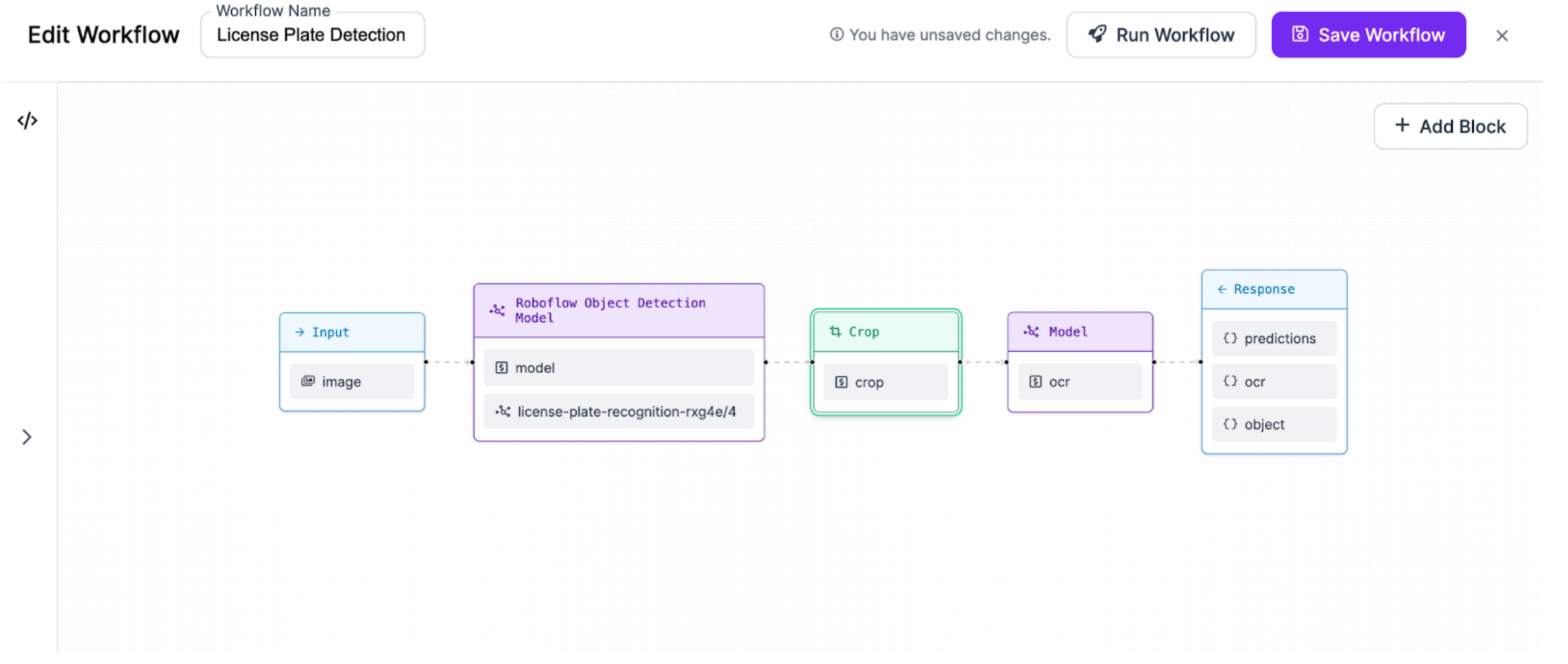
<figure><img src="https://media.roboflow.com/inference/workflow-example.png" alt="A license plate detection Workflow"><figcaption><p>A license plate detection application built with Workflows</p></figcaption></figure>

## Manage

* [Manage Workflows](/workflows/manage/manage-workflows.md) - organize the Workflows in your workspace
* [Manage Workflow Versions](/workflows/manage/manage-workflow-versions.md) - track and roll back changes over time
* [Share a Workflow](/workflows/manage/share-a-workflow.md) and [Delete a Workflow](/workflows/manage/delete-a-workflow.md)

## Blocks & Integrations

* [Workflow Blocks](/workflows/blocks/blocks.md) - the full catalog of Blocks, grouped by category, with inputs, outputs, and usage
* [Blocks Governance](/workflows/blocks/blocks-governance.md) - control which Blocks are enabled across your workspace
* [Enterprise Integrations](/workflows/deploy/enterprise-integrations.md) - integrations available to enterprise customers

## Extend Workflows

* [Developer Guide](/workflows/developer-guide/developer-guide.md) - the Workflow Definition language, the Compiler and Execution Engine, kinds, and how to write and publish your own Blocks
* [Video Processing](/workflows/deploy/video-processing.md) - run Workflows on video frames and streams

Ready to put a Workflow into production? See [Deploy a Workflow](/workflows/deploy/deploy-a-workflow.md) and the [Deployment documentation](https://docs.roboflow.com/deployment) for cloud, dedicated, and self-hosted options.
