

What is Upmind’s knowledge base?
Upmind’s knowledge base is a structured, regularly updated, self-service documentation library covering the full platform, from your first login and billing configuration through to provisioning, payment gateway integrations, and developer tools. It’s built for hosting companies, digital agencies, and managed service providers who need reliable answers quickly, and it’s the kind of resource you’ll return to regularly, not just when something goes wrong. This guide introduces you to how the knowledge base is laid out, what kinds of guides you’ll find, and the quickest ways to get to the information you need.How the documentation is organised
The knowledge base follows the natural flow of using Upmind, starting from account creation and moving through setup, daily operations, and more advanced features. Here’s what each section covers:- Getting Started - This is where everything begins. These guides cover how to create your account, an overview of what Upmind does, and the difference between the Admin Area and the Client Area. Start here if you’re new to the platform.
- Managing Your Account - This covers admin profile management, password and security settings, the dashboard overview, and plan upgrades.
- Setup & Configuration - This is one of the most important sections and is worth working through early. It covers branding, multi-brand setups, staff users, notifications, email configuration, data imports from platforms like WHMCS, and order flow settings and building out your initial product catalogue. Getting your products configured early is one of the first things you’ll need before you can start taking orders. This also includes creating product groups, configuring pricing, setting billing cycles, and linking products to provisioning modules so they’re ready to sell.
- Using Upmind - This is the largest section, covering day-to-day platform use. Guides here include client management, the service desk, subscriptions, invoicing, taxes, payment methods, product catalogues, provisioning, promotions, reports, and affiliates.
- Using Cart 2.0 - This covers Upmind’s updated storefront and checkout experience, including guides specific to the Cart 2.0 interface.
- Client Self-Service - This covers the client-facing side of the platform, from registration and login through to managing orders, invoices, payment methods, and support tickets. Useful if you want to understand the experience your clients are having.
- For Web Hosts - This is built for hosting companies and resellers. It covers domain management, registrar integrations (Enom, ResellerClub, Namecheap, GoDaddy), cPanel/WHM provisioning, Plesk, DirectAdmin, website builders, VPS and server products, email services, and software licensing.
- Guides for Web Hosting Accounts - This provides hands-on walkthroughs for linking WHM accounts, creating hosting packages, and managing the order-to-provisioning flow.
- For Digital Agencies - This contains a quick-start guide for agencies managing client billing, subscriptions, and services through Upmind.
- For Managed Service Providers - This has a dedicated quick-start guide focused on the workflows most relevant to MSP operations.
- Developers - This contains the technical documentation for anyone building on top of Upmind or extending its functionality. It covers API token generation, webhook setup, all supported webhook event types, and the custom Stripe SDK payment flow.
- Legal and Information - This holds the platform’s security documentation, terms and conditions, privacy policy, and Upmind’s IP address list for firewall whitelisting.
Finding what you need
The following provides a breakdown of the ways you can navigate through Upmind’s knowledge base:- Use the search bar - The knowledge base has a search function built in. Typing a keyword, feature name, or plain-language question like “add payment gateway,” “cancel subscription,” or “cPanel provisioning” will surface the most relevant guides. On the Help Center, you can open search instantly using ⌘K on a Mac or Ctrl+K on Windows, which is handy when you’re in a hurry.
- Browse by section - If you’re not quite sure what to search for, the collection cards on the Help Center let you navigate by topic. Starting from the section that best matches what you’re trying to do is often the fastest route when you’re working through something unfamiliar.
- Follow the “What’s Next” links - Many guides end with a “What’s Next” section pointing you toward the logical follow-up step. These are particularly helpful when you’re working through a multi-step setup process and want to make sure you’re not missing anything.
- Check for video tutorials - Some guides link out to YouTube tutorials that walk you through the process visually. The Getting Started guide, for example, includes a full video walkthrough of the account setup, which can be easier to follow than text alone if you’re a first-time user.
Types of guides you’ll find
The documentation uses a few distinct guide formats, and knowing which type you’re looking at helps set the right expectations.- How-to guides - These are the most common format. They walk you through a specific task from start to finish with numbered steps and screenshots. Examples include “How to Add Stripe as a Payment Method,” “How to Create Staff Users,” and “How to Configure Invoice Settings.” These are the guides to reach for when you need to get something done.
- Concept overviews - These step back from the step-by-step and explain how a feature or system works at a higher level. They’re worth reading before you jump into configuration, because understanding what something does makes the setup steps easier to follow. Examples include “What is Provisioning?,” “About Multi-Currency,” and “How Does Email Work in Upmind.”
- Reference guides - These are structured, information-dense pieces designed to be consulted repeatedly rather than read start to finish. Good examples are the Email Template Twig Variables Overview, the Webhook Events documentation broken down by trigger type, and the Available Payment Gateways list.
- Quick-start guides - These give you a condensed, opinionated path through the setup process for a specific use case. Rather than reading dozens of individual guides, a quick-start guide pulls together the most important steps in a logical order. There are dedicated guides for web hosting companies, digital agencies, and managed service providers.
- FAQ-style guides - These are short, single-question answers written for when something isn’t working as expected or you’re unsure about a specific behaviour. Examples include “Why Your TLD isn’t Showing in the Store” and “What If Your Product or Service is Not Showing?”
Callout types to watch for
As you read through the documentation, you’ll come across highlighted callout blocks that draw your attention to something specific. These aren’t decorative, but they often contain information that would be easy to miss if it were buried in a paragraph.Note provides background context or clarification about how something works. Read these when you want a fuller understanding of a feature before you configure it.
Danger highlights restrictions or limitations attached to a particular feature or action. Knowing these upfront prevents surprises after you’ve already made changes.
Staying up to date
Upmind is actively developed, and the platform changes regularly. New features are added, existing features are improved, and the documentation is updated to reflect those changes. Bookmarking a couple of key pages is a good way to stay informed without having to hunt for updates.- Changelog is a running log of everything that’s been released, updated, or fixed. Checking it periodically is a good habit, especially if you’ve noticed something in the platform behaving differently or if you want to know whether a feature you’ve been waiting for has shipped. You can find more information here.
- Roadmap shows you what the team is working on and what’s coming next. You can find more information here.
- Feedback is where you can submit feature requests and vote on suggestions from other users. Requests that get traction tend to find their way onto the roadmap, so it’s worth checking whether someone else has already raised something you’ve been thinking about. You can find more information here.
Still need help?
The knowledge base covers the vast majority of questions that come up during setup and day-to-day use, but there will be times when you need to speak to someone directly. Upmind offers support through the Admin Area for situations where the documentation doesn’t have the answer you need. To reach the support team:- Log in to your Upmind Admin Area.
- Click Help at the top of your dashboard and click Open a support ticket.

- If you need live chat support, Chatwoot is available. Head to the Upmind website and look for the chat widget in the bottom-right corner of the page. From there, you can start a conversation with the team directly.
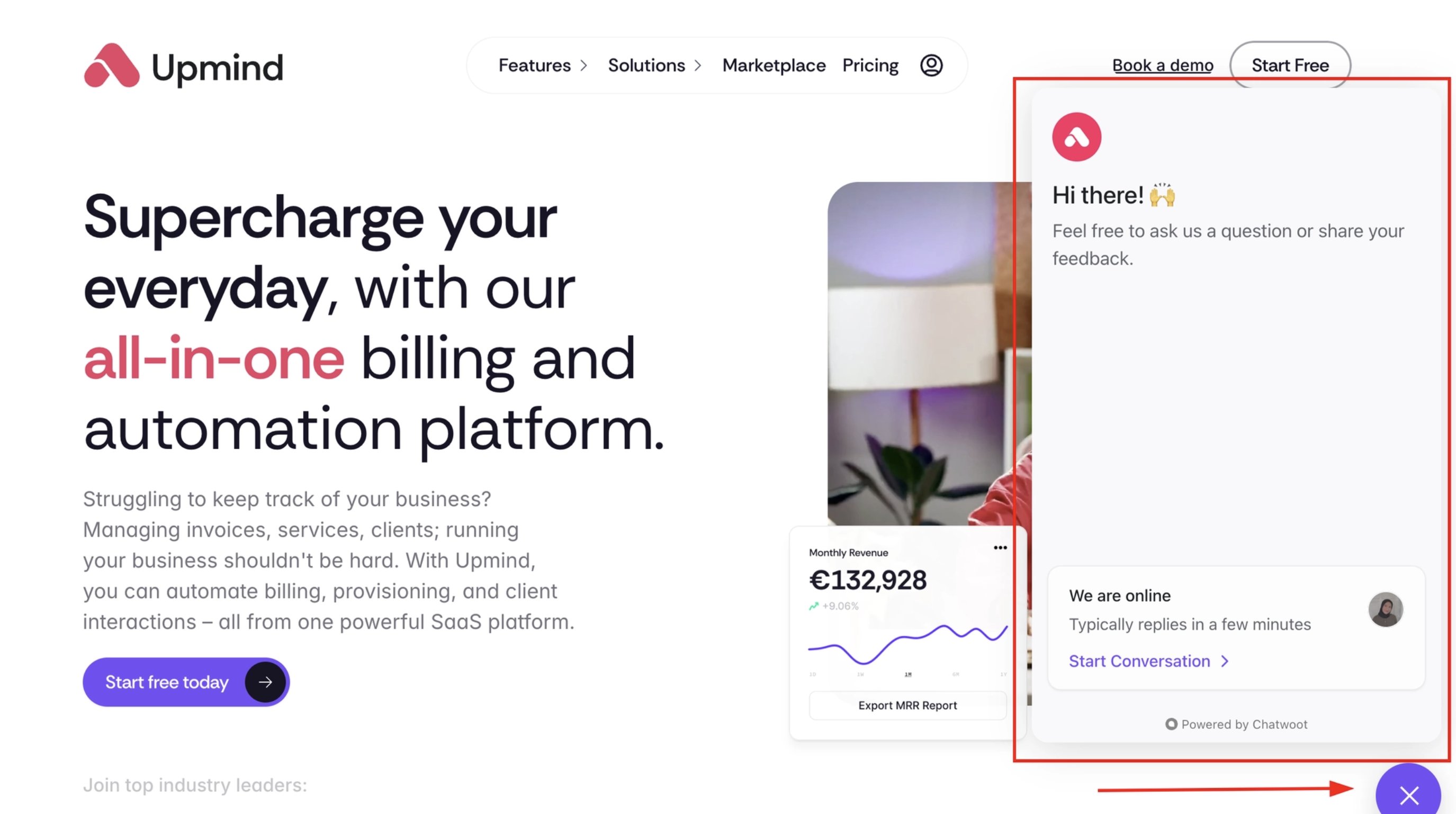
Chatwoot support
- You can also email us at support@upmind.com.
A few useful links to bookmark
- Upmind Changelog features.upmind.com/changelog
- Upmind Roadmap features.upmind.com/roadmap
- Upmind Marketplace upmind.com/marketplace
- Start a Free Account upmind.com/start
- Read our Blogs upmind.com/blog
- Contact Support upmind.com/support
- Upmind API Documentation apidocs.upmind.com
- Upmind Pricing Plans https://upmind.com/pricing