

Depending on where you’re at in your journey with learning programming languages (and specifically, C++), LearnCpp.com might be the only resource you’re using to learn C++ or to look something up. LearnCpp.com is designed to explain concepts in a beginner-friendly fashion, but it simply can’t cover every aspect of the language. As you begin to explore outside the topics that these tutorials cover, you’ll inevitably run into questions that these tutorials don’t answer. In that case, you’ll need to leverage outside resources.
One such resource is Stack Overflow, where you can ask questions (or better, read the answer to the same question someone before you asked). But sometimes a better first stop is a reference guide. Unlike tutorials, which tend to focus on the most important topics and use informal/common language to make learning easier, reference guides describe C++ precisely using formal terminology. Because of this, reference material tends to be comprehensive, accurate, and… hard to understand.
In this lesson, we’ll show how to use cppreference, a popular standard reference that we refer to throughout the lessons, by researching 3 examples.
Overview
Cppreference greets you with an overview of the core language and libraries:
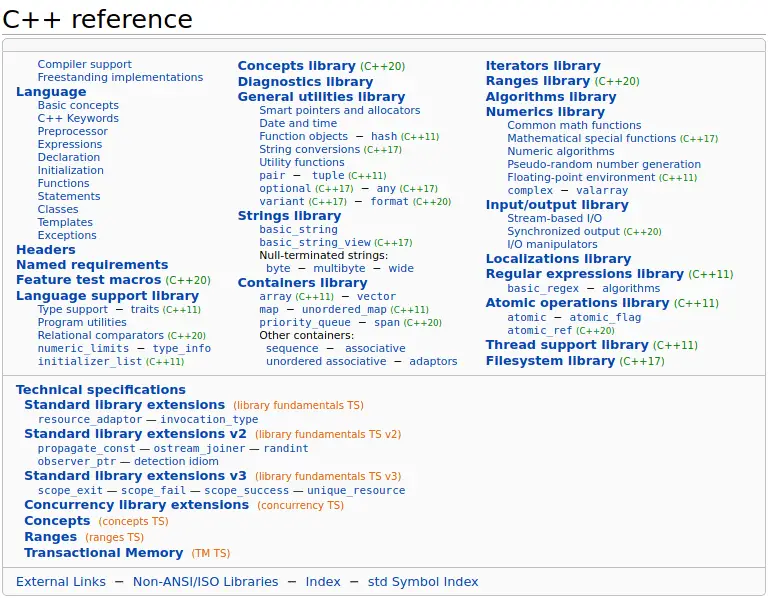
From here, you can get to everything cppreference has to offer, but it’s easier to use the search function, or a search engine. The overview is a great place to visit once you’ve finished the tutorials on LearnCpp.com, to delve deeper into the libraries, and to see what else the language has to offer that you might not be aware of.
The upper half of the table shows features currently in the language, while the bottom half shows technical specifications, which are features that may or may not be added to C++ in a future version, or have already been partially accepted into the language. This can be useful if you want to see what new capabilities are coming soon.
Starting with C++11, cppreference marks all features with the language standard version they’ve been added in. The standard version is the little green number you can see next to some of the links in the above image. Features without a version number have been available since C++98/03. The version numbers are not only in the overview, but everywhere on cppreference, letting you know exactly what you can or cannot use in a specific C++ version.
Warning
If you use a search engine and a technical specification has just been accepted into the standard, you might get linked to a technical specification rather than the official reference, which can differ.
Tip
Cppreference is a reference for both C++ and C. Since C++ shares some function names with C, you may find yourself in the C reference after searching for something. The URL and the navigation bar at the top of cppreference always show you if you’re browsing the C or C++ reference.
std::string::length
We’ll start by researching a function that you know from a previous lesson, std::string::length, which returns the length of a string.
On the top right of cppreference, search for “string”. Doing so shows a long list of types and functions, of which only the top is relevant for now.
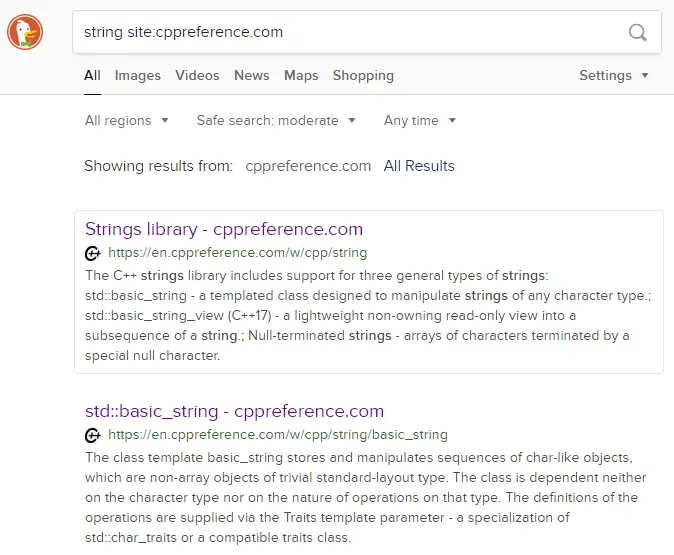
We could have searched for “string length” right away, but for the purpose of showing as much as possible in this lesson, we’re taking the long route. Clicking on “Strings library” takes us to a page talking about the various kinds of strings that C++ supports.
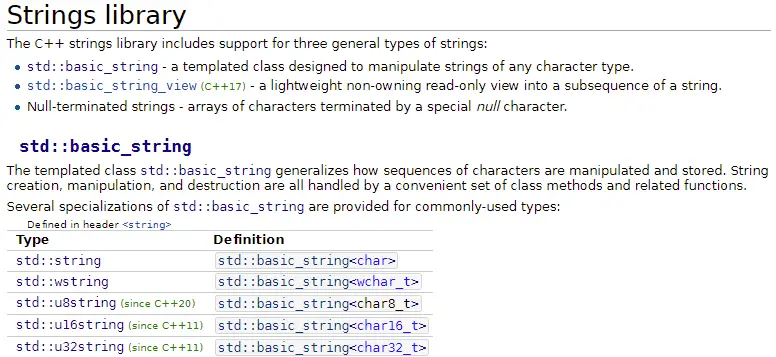
If we look under the “std::basic_string” section, we can see a list of typedefs, and within that list is std::string.
Clicking on “std::string” leads to the page for std::basic_string. There is no page for std::string, because std::string is a typedef for std::basic_string<char>, which again can be seen in the typedef list:
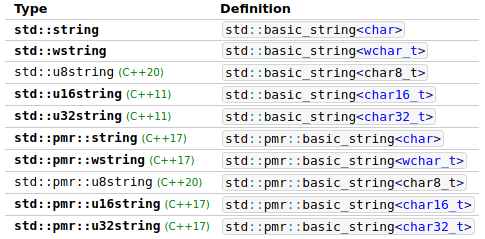
The <char> means that each character of the string is of type char. You’ll note that C++ offers other strings that use different character types. These can be useful when using Unicode instead of ASCII.
Further down the same page, there’s a list of member functions (the behaviors that a type has). If you want to know what you can do with a type, this list is very convenient. In this list, you’ll find a row for length (and size).
Following the link brings us to the detailed function description of length and size, which both do the same thing.
The top of each page starts with a short summary of the feature and syntax, overloads, or declarations:
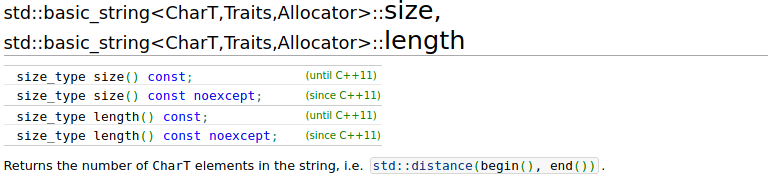
The title of the page shows the name of the class and function with all template parameters. We can ignore this part. Below the title, we see all of the different function overloads (different versions of the function that share the same name) and which language standard they apply to.
Below that, we can see the parameters that the function takes, and what the return value means.
Because std::string::length is a simple function, there’s not a lot of content on this page. Many pages show example uses of the feature they’re documenting, as does this one:
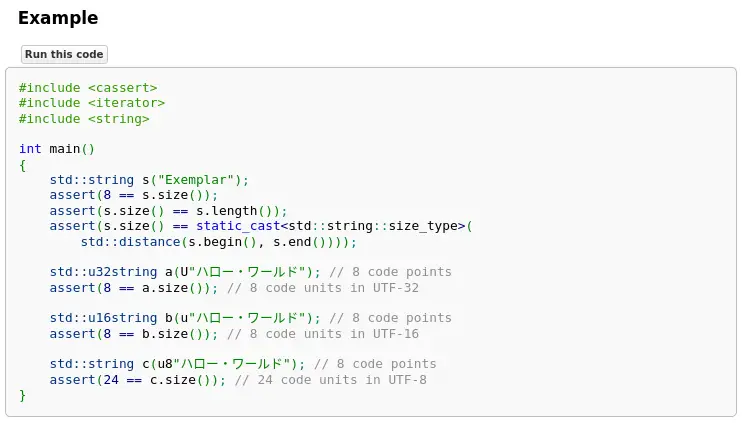
While you’re still learning C++, there will be features in the examples that you haven’t seen before. If there are enough examples, you’re probably able to understand a sufficient amount of it to get an idea of how the function is used and what it does. If the example is too complicated, you can search for an example somewhere else or read the reference of the parts you don’t understand (you can click on functions and types in the examples to see what they do).
Now we know what std::string::length does, but we knew that before. Let’s have a look at something new!
std::cin.ignore
In lesson 9.5 -- std::cin and handling invalid input, we talked about std::cin.ignore, which is used to ignore everything up to a line break. One of the parameters of this function is some long and verbose value. What was that again? Can’t you just use a big number? What does this argument do anyway? Let’s figure it out!
Typing “std::cin.ignore” into the cppreference search yields the following results:
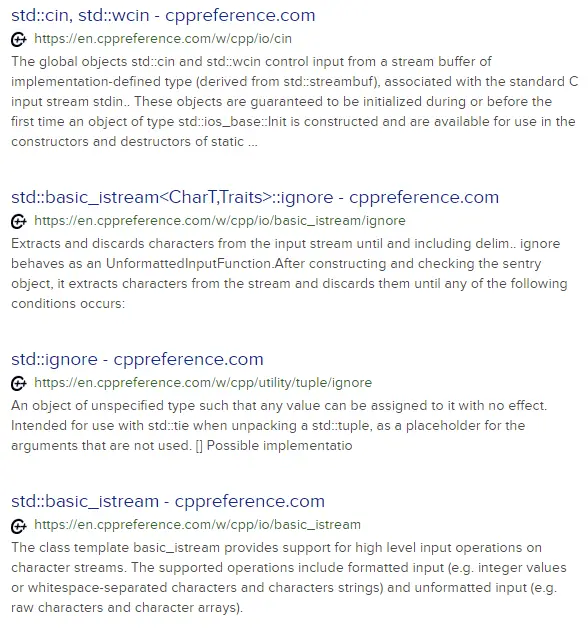
std::cin, std::wcin- We want.ignore, not plainstd::cin.std::basic_istream<CharT,Traits>::ignore- Eew, what is this? Let’s skip for now.std::ignore- No, that’s not it.std::basic_istream- That’s not it either.
It’s not there, what now? Let’s go to std::cin and work our way from there. There’s nothing immediately obvious on that page. On the top, we can see the declaration of std::cin and std::wcin, and it tells us which header we need to include to use std::cin:

We can see that std::cin is an object of type std::istream. Let’s follow the link to std::istream:
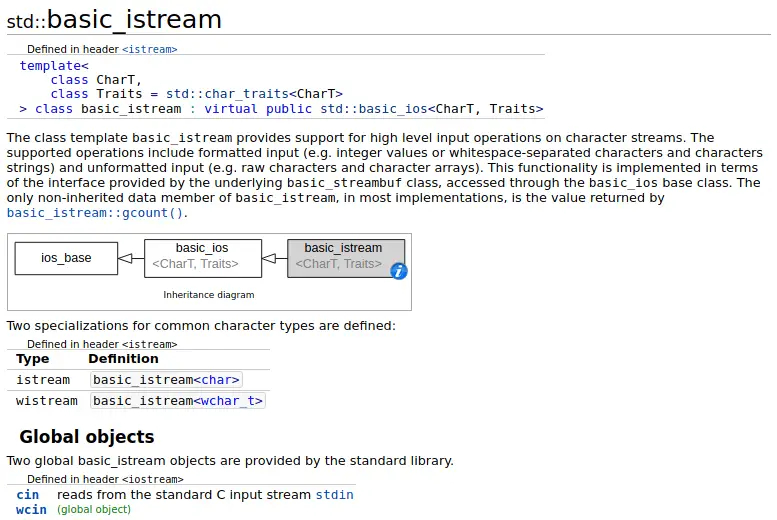
Hold up! We’ve seen std::basic_istream before when we searched for “std::cin.ignore” in our search engine. It turns out that istream is a typedef name for basic_istream, so maybe our search wasn’t so wrong after all.
Scrolling down on that page, we’re greeted with familiar functions:
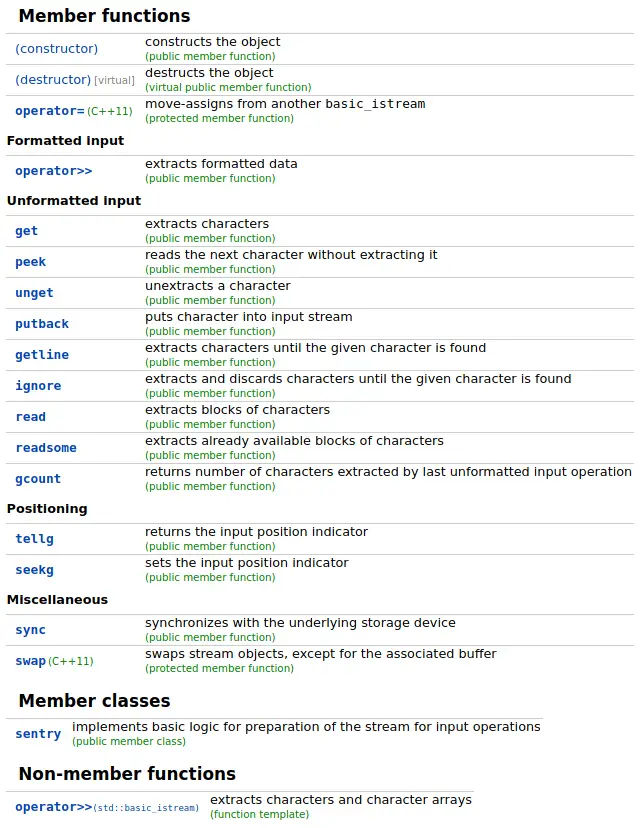
We’ve used many of these functions already: operator>>, get, getline, ignore. Scroll around on that page to get an idea of what else there is in std::cin. Then click ignore, since that’s what we’re interested in.
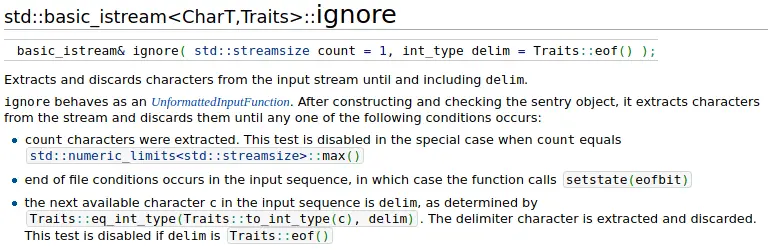
On the top of the page there’s the function signature and a description of what the function and its two parameters do. The = signs after the parameters indicate a default argument (we cover this in lesson 11.5 -- Default arguments). If we don’t provide an argument for a parameter that has a default value, the default value is used.
The first bullet point answers all of our questions. We can see that std::numeric_limits<std::streamsize>::max() has special meaning to std::cin.ignore, in that it disables the character count check. This means std::cin.ignore will continue ignoring characters until it finds the delimiter, or until it runs out of characters to look at.
Many times, you don’t need to read the entire description of a function if you already know it but forgot what the parameters or return value mean. In such situations, reading the parameter or return value description suffices.
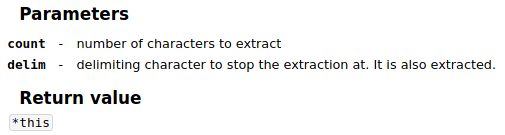
The parameter description is brief. It doesn’t contain the special handling of std::numeric_limits<std::streamsize>::max() or the other stop conditions, but serves as a good reminder.
A language grammar example
Alongside the standard library, cppreference also documents the language grammar. Here’s a valid program:
#include <iostream>

int getUserInput()
{
  int i{};
  std::cin >> i;
  return i;
}

int main()
{
  std::cout << "How many bananas did you eat today? \n";

  if (int iBananasEaten{ getUserInput() }; iBananasEaten <= 2)
  {
    std::cout << "Yummy\n";
  }
  else
  {
    std::cout << iBananasEaten << " is a lot!\n";
  }

  return 0;
}
Why is there a variable definition inside the condition of the if-statement? Let’s use cppreference to figure out what it does by searching for “cppreference if statement” in our favorite search engine. Doing so leads us to if statements. At the top, there’s a syntax reference.
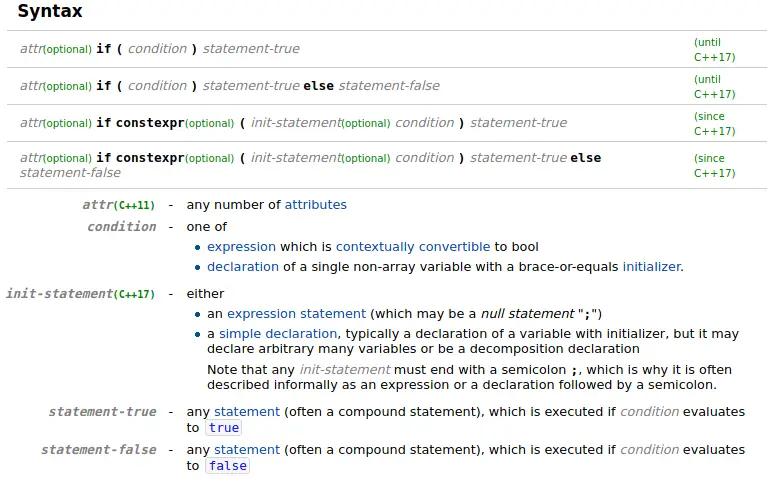
Look at the syntax for the if-statement. If you remove all of the optional parts, you get an if-statement that you already know. Before the condition, there’s an optional init-statement, that looks like what’s happening in the code above.
if ( init-statement condition ) statement-true
if ( init-statement condition ) statement-true else statement-false
Below the syntax reference, there’s an explanation of each part of the syntax, including the init-statement. It says that the init-statement is typically a declaration of a variable with an initializer.
Following the syntax is an explanation of if-statements and simple examples:
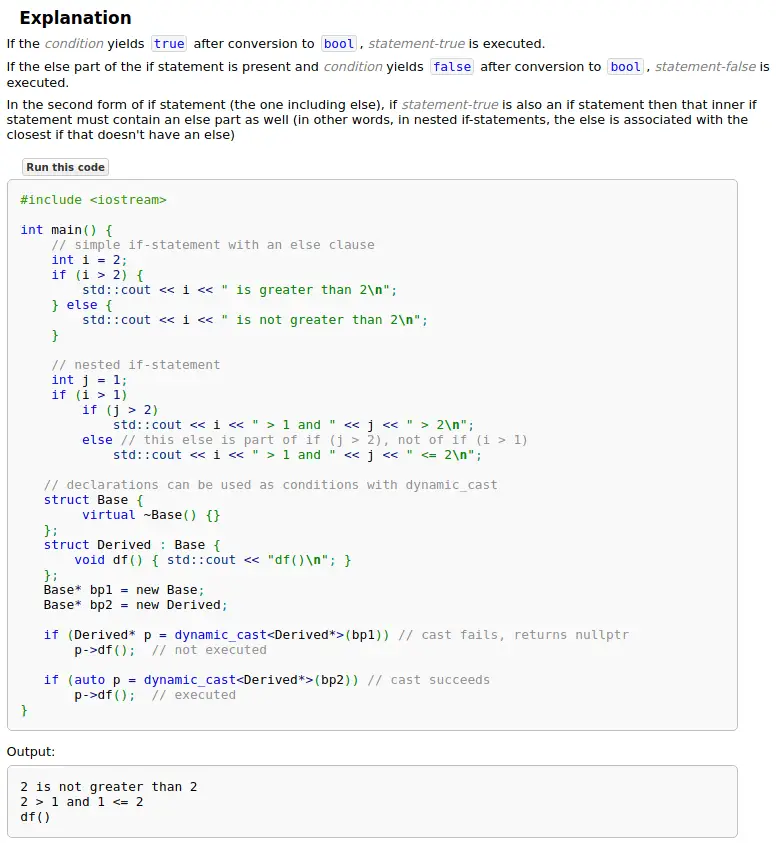
We already know how if-statements work, and the examples don’t include an init-statement, so we scroll down a little to find a section dedicated to if-statements with initializers:
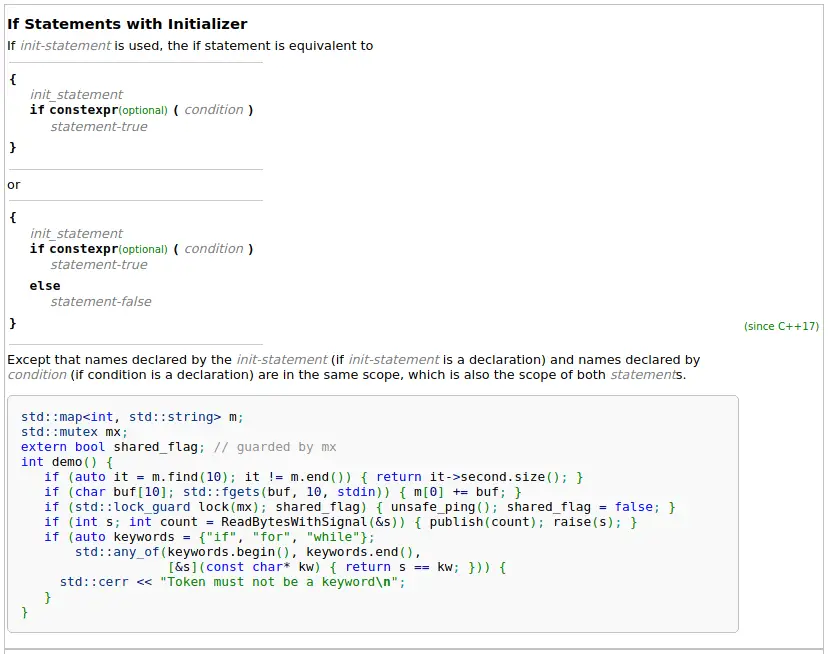
First, it is shown how the init-statement can be written without actually using an init-statement. Now we know what the code in question is doing. It’s a normal variable declaration, just merged into the if-statement.
The sentence after that is interesting, because it lets us know that the names from the init-statement are available in both statements (statement-true and statement-false). This may be surprising, since you might otherwise assume the variable is only available in the statement-true.
The init-statement examples use features and types that we haven’t covered yet. You don’t have to understand everything you see to understand how the init-statement works. Let’s skip everything that’s too confusing until we find something we can work with:
// Iterators, we don't know them. Skip.
if (auto it = m.find(10); it != m.end()) { return it->second.size(); }

// [10], what's that? Skip.
if (char buf[10]; std::fgets(buf, 10, stdin)) { m[0] += buf; }

// std::lock_guard, we don't know that, but it's some type. We know what types are!
if (std::lock_guard lock(mx); shared_flag) { unsafe_ping(); shared_flag = false; }

// This is easy, that's an int!
if (int s; int count = ReadBytesWithSignal(&s)) { publish(count); raise(s); }

// Whew, no thanks!
if (auto keywords = {"if", "for", "while"};
    std::any_of(keywords.begin(), keywords.end(),
                [&s](const char* kw) { return s == kw; })) {
  std::cerr << "Token must not be a keyword\n";
}
The easiest example seems to be the one with an int. Then we look after the semicolon and there’s another definition, odd… Let’s go back to the std::lock_guard example.
if (std::lock_guard lock(mx); shared_flag)
{
  unsafe_ping();
  shared_flag = false;
}
From this, it’s relatively easy to see how an init-statement works. Define some variable (lock), then a semicolon, then the condition. That’s exactly what happened in our example.
A warning about the accuracy of cppreference
Cppreference is not an official documentation source -- rather, it is a wiki. With wikis, anyone can add and modify content -- the content is sourced from the community. Although this means that it’s easy for someone to add wrong information, that misinformation is typically quickly caught and removed, making cppreference a reliable source.
The only official source for C++ is the standard (Free drafts on github), which is a formal document and not easily usable as a reference.
Quiz time
Question #1
What does the following program print? Don’t run it, use a reference to figure out what erase does.
#include <iostream>
#include <string>

int main()
{
  std::string str{ "The rice is cooking" };

  str.erase(4, 11);

  std::cout << str << '\n';

  return 0;
}
Tip
When you find erase on cppreference, you can ignore the overloads that use iterators.
Tip
Indexes in C++ start at 0. The character at index 0 in the string “House” is ‘H’, at 1 it’s ‘o’, and so on.
Question #2
In the following code, modify str so that its value is “I saw a blue car yesterday.” without repeating the string. For example, don’t do this:
str = "I saw a blue car yesterday.";You only need to call one function to replace “red” with “blue”.
#include <iostream>
#include <string>

int main()
{
  std::string str{ "I saw a red car yesterday." };

  // ...

  std::cout << str << '\n'; // I saw a blue car yesterday.

  return 0;
}